This article is about how I run two personal AI assistants — one for myself and one for my wife — on a single dedicated server, at a cost that might surprise you. It covers the deployment model, the security rationale, how users interact with their agents day to day, and what it would take to do something similar yourself.
The Big Picture
AI assistants are everywhere. But most of them live on someone else’s infrastructure, process your data on someone else’s servers, and operate under someone else’s terms of service. For a technologist — or a professional who handles sensitive information — that is a meaningful constraint.
What I have built instead is a setup where each AI agent runs on hardware I control, in a jurisdiction I choose (Germany, under EU law), with a security posture I can audit. The total cost is roughly €70/month for the server, plus a $20/year domain registration, plus LLM API costs. For that, I run five virtual machines on the same blade: three websites and two independent AI agent installations.
The Infrastructure Stack
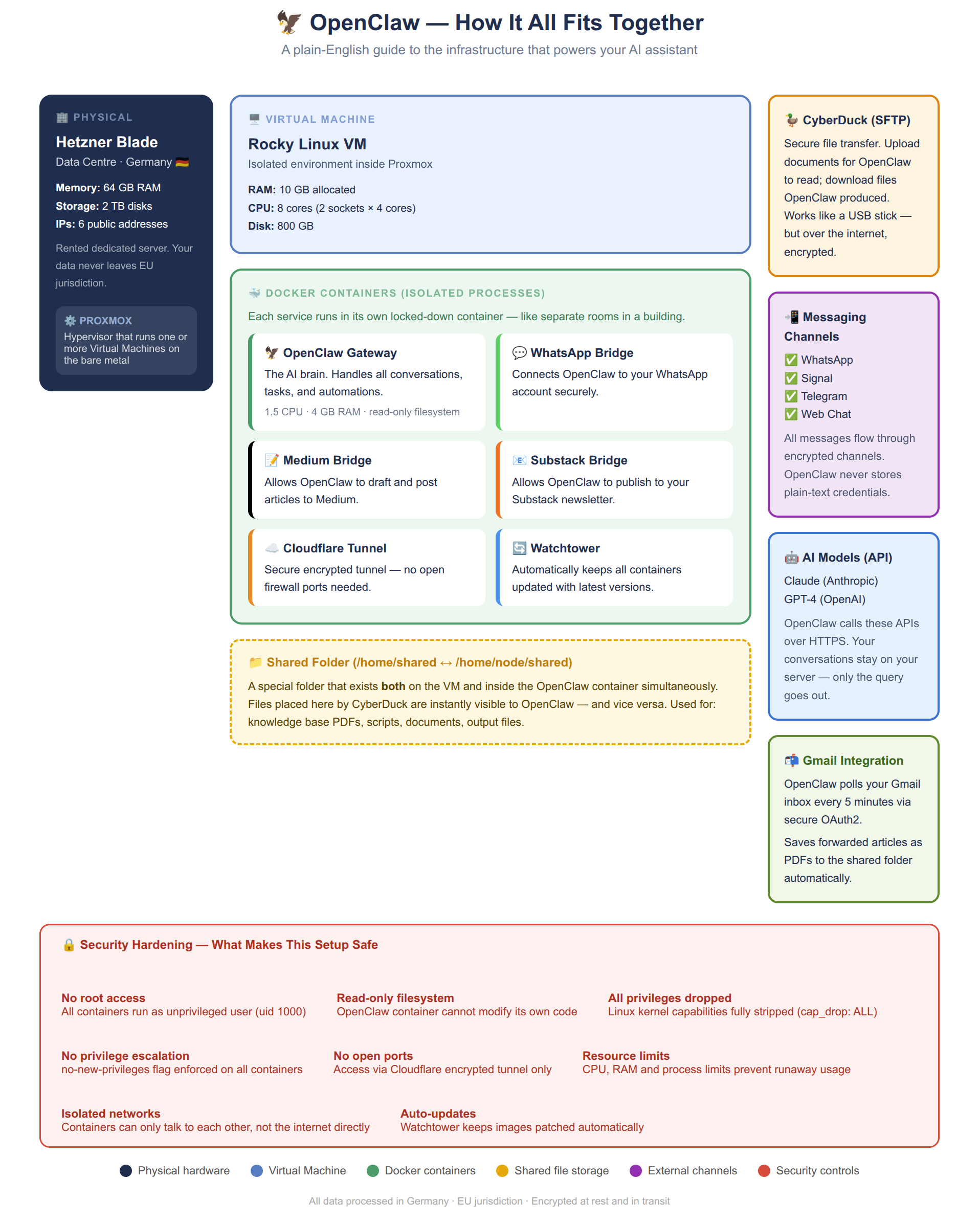
- Physical layer: A Hetzner dedicated blade server in Germany. 64 GB RAM, 2 TB disk, six public IPs. EU jurisdiction means GDPR protections apply by default.
- Hypervisor: Proxmox — open-source virtualisation running directly on the bare metal, carving the hardware into isolated virtual machines.
- Virtual machines: Five VMs — three running websites, two running AI agent stacks. Each is independently isolated.
- Containers: Inside each AI VM, Docker containers run the OpenClaw gateway, messaging bridges (WhatsApp, Signal, Substack, Medium), a Cloudflare tunnel, and a Watchtower auto-updater.
- Shared volume: A folder mapped between the VM and the container — how files flow in and out.
This is not an entry-level setup. A blade server, Proxmox, and multiple VMs requires genuine sysadmin experience. A simpler starting point: a single VPS from Hetzner Cloud, DigitalOcean, or Vultr running Docker — perfectly sufficient for a personal AI agent at a fraction of the cost and complexity.
Security Through the Deployment Model
Security here is not primarily about firewalls. It is about architectural choices that eliminate entire categories of risk.
No open ports
The OpenClaw container exposes no ports to the public internet directly. All traffic flows through a Cloudflare tunnel — an outbound-only encrypted connection. There is no TCP port to scan, probe, or attack. The server is invisible to port scanners.
Container hardening
read_only: true— the container filesystem is immutable at runtime. Malware cannot write to it.cap_drop: ALL— every Linux kernel capability stripped. No ability to bind privileged ports or modify network interfaces.no-new-privileges: true— no privilege escalation possible.user: 1000:1000— runs as non-root. If something escapes the container, it lands as an unprivileged user.- CPU, memory, and process count explicitly capped.
Data sovereignty
Your conversations, files, and agent memory all live on hardware you control, in a jurisdiction with strong data protection laws. LLM API calls go to Anthropic over HTTPS, but context, history, and the knowledge base never leave your server.
How Users Actually Interact With Their Agent
Three complementary channels, each suited to a different type of exchange.
On-the-fly via Signal
For quick exchanges — “what’s on my calendar?”, “remind me in 20 minutes”, “summarise this” — Signal is ideal. End-to-end encrypted, works on every device, agent responds in seconds.
Longer exchanges via email
Each agent has its own Gmail address — an independent persona entirely separate from its owner. My agent has its own Gmail account. When I want to send a long article, document, or detailed instructions, I email it directly. The agent polls its inbox every five minutes and acts on what arrives. It can also send email back — operating as a genuine participant in email conversations, not just a chat window.
File exchange via CyberDuck / FileZilla
CyberDuck (macOS/Windows) and FileZilla (Linux/Windows/macOS) connect to the server over SSH and present the shared folder as a local drive. Drop a file in, the agent reads it within seconds. The agent saves outputs there, and they appear immediately for download. In practice: I forward interesting articles to the agent’s email; it fetches the content, generates a PDF, and saves it to the shared folder — building a personal knowledge base over time.
The Cost Reality
| Item | Cost | Notes |
|---|---|---|
| Hetzner blade | ~€70/month | 5 VMs: 3 websites + 2 agent installs |
| Domain registration | $20/year | GoDaddy + Cloudflare free plan |
| Cloudflare | Free | Tunnel, DNS, DDoS protection |
| LLM API (Anthropic) | Variable | Claude Sonnet 4.6 primary, Haiku fallback. Cloud APIs remain the most affordable option — local GPU inference starts at €214/month. |
The LLM cost is the main variable. The practical approach is to configure a tiered strategy: use a less expensive model (Claude Haiku) for routine tasks — inbox polling, summarisation, reminders — and reserve the more capable model (Sonnet) for substantive work. This keeps the bill manageable while preserving quality where it matters.
What about running models locally? It is a tempting idea, but the economics are harder than they appear. Running an open-source model via Ollama at acceptable speed requires a GPU. A Hetzner blade with a GPU starts at around €214/month — three times the cost of the CPU-only blade I use. A number of people in the OpenClaw community have gone the Mac Mini route: Apple’s unified memory architecture makes it genuinely capable of running mid-sized models locally, and a Mac Mini M4 is a reasonable one-off purchase. The catch is scale: a single Mac Mini has a ceiling, and once you hit it, you are looking at building a cluster of four or more machines to match what a cloud API delivers on demand. For most users, cloud LLM APIs remain the most cost-effective and operationally simple option. The infrastructure you control; the model you rent.
A simpler VPS setup brings the fixed infrastructure cost down to €5–10/month, making the LLM API the dominant cost — which is actually a reasonable trade-off since you only pay for what you use.
What Is OpenClaw?
OpenClaw is an open-source, self-hosted AI assistant gateway. It connects to LLM APIs, handles memory and context across sessions, integrates with messaging platforms, and provides a platform for automation. Think of it as the connective tissue between AI models, your communication channels, and your files. Documentation at docs.openclaw.ai.
Elio Bonazzi is a Data Architect and Technical Team Leader based in Singapore. This setup is live and in daily use.